
What’s New Sybiz Vision 26.00

Important Information
Custom field display requires some reconfiguration
Custom Fields, also known as Extended Properties will appear with a '- ep' suffix in some areas of the software. As a result, custom fields that are placed in columns in standard grids (eg customer, product) and custom fields on transaction lines (ie grid area) will need to be added back where necessary using the right click 'Column Chooser' option.
Web API requires upgrading
Web API requires upgrading to the latest version (3.20) when upgrading Sybiz Vision 26.00 due to new security restrictions in place and other technology updates.
Minimum supported version of Microsoft SQL Server
The minimum supported versions of Microsoft SQL Server for Sybiz Vision 26 is 2017 (the same as the previous three versions). These compatibility levels are enforced with a message displaying on upgrade to version 23.00+ if the user’s minimum requirements fall outside of this scope prior to the database being upgraded.
We recommend that anyone upgrading their Microsoft SQL Server upgrades to the latest version available at the time, rather than to the minimum supported version, for not only greater longevity but also better performance capabilities. Sybiz 26 is compatible with the recently released Microsoft SQL Server 2025.
Operating system compatibility
Certain older operating systems (Microsoft Windows XP, some versions of Microsoft Windows Vista and Microsoft Server 2003), Microsoft SQL Server (2008, 2008R2, 2012, 2016), and Microsoft Windows Server 2012 are not compatible with Sybiz 26.00 — if uncertain consult your Authorised Business Partner prior to upgrading. Microsoft Windows 11 is supported for Sybiz 26.00 with compatibility extending to some other later versions of Sybiz solutions.
DevExpress upgrade
Version 26.00 of Sybiz Vision utilises DevExpress version 25.1.6.0.
New & Enhanced
General Ledger Report Refresh
Sybiz has updated all standard report layouts in Sybiz Vision. Report data and calculations remain unchanged — only the appearance of standard layouts has been modernised. Custom report copies are unaffected and will continue to behave as before.
General Ledger and Lookup reports have been updated in 26.00, with the remaining report library scheduled to continue in Sybiz Vision 26.10.
These changes introduce a consistent layout standard, improve export reliability (no more annoying blank rows and columns), take advantage of new DevExpress Expressions, and prioritise readability for soft copy output over physical printing. A small number of outdated reports will also begin transitioning to an archive process based on customer feedback.
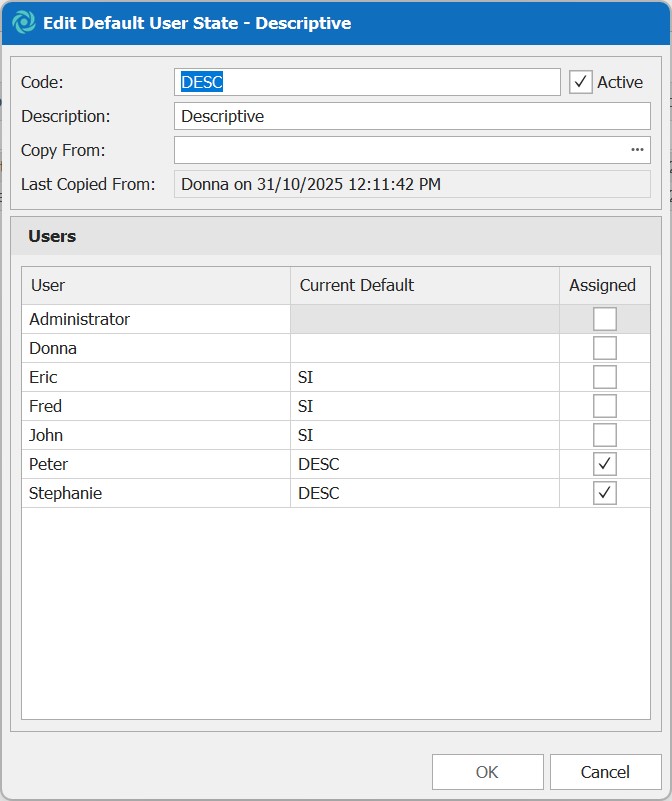
Assign Default User States to Users
Default User States make it easy to apply a consistent workspace for individual users. Once copied from an existing user, the default state can then be assigned to a user which will be used to control which columns/settings are applied to screens within the desktop program. Changes to grids will be allowed, but reset once the user closes the screen, restoring back to the default state. (CR210646248)
Cashflow Statement & Cashflow Account Type classification
A new cashflow statement report is available to provide insight as to what activities are contributing to the cash position of the company based on transaction date and the new cashflow account type assigned to general ledger accounts that are directly used by cashbook and similar transactions. (CR2309-2592)

SMS activities native within Sybiz
SMS activities can be created and sent via the SMS settings configured within the company options. There is also breakpoint support to create an activity when sending an SMS from breakpoints so that it's logged against a customer. (CR2412-4271)

Manage Open Banking consent and notifications
Users can now manage consent and notifications from within Vision when using Open Banking accounts within bank feeds. (CR2312-2945)
Invoice customers available for jobs
Jobs now have a customer and invoice customer assigned to them, similar to how service requests worked previously. This allows a job to be assigned to one customer, but invoiced by another party, such as in a situation involving head-office and branch accounts. You will not be able to change if the head-office or branch customer is invoiced at the time of job or service invoicing. (CR2410-4082)
Greater control over column sizes in transactions
Depending on currencies used and magnitudes of value, certain columns may not have displayed full values due to maximum width constraints. These constraints have been removed and resizing columns can occur after the relevant transactions' user state has been cleared (CR2509-5048)
Simple job and service request creation on the go
Create a new job or service request in the mobile apps using a template to pre-fill all the required information, allowing simple job or service request creation on the go. Available for users with the appropriate permissions and when automatic numbering is turned on for jobs or service requests. (CR2404-3480)
Colour coding in Vision Jobs and Vision Service mobile apps
Colour coding of scheduled jobs and service tasks will carry over into their respective mobile apps, making it easier to get the right information at a glance. (CR2412-4249)
Swipe to open in Vision Jobs and Vision Service mobiles apps
Users can now swipe to open the job / service request from the agenda or whilst viewing the appointment directly (CR2412-4250)
Take and store video with Vision Service
Videos can now be taken and stored within the Vision Service mobile app. (CR2412-4269)
Fewer scheduling overlaps for jobs and service appointments
A warning is displayed if the selected booking time overlaps with another appointment for the selected staff member. This is display when editing from the scheduler, a manual appointment or from the mobile app. (CR2501-4302)
View schedule requests from another user’s point of view
Users now have the ability to see scheduled requests "as" another staff member. (CR2502-4456)
Breakpoint help based on object type added
A new breakpoint helper method based on object type has been created to allow for a simple input box to be created and selecting based on existing lookup controls (eg. customer, product, job, etc) (CR2502-4420)
Fewer errors using Pay and Process Clearing Wizard
The Pay and Process Clearing Wizard will select no transactions by default, which will require interaction by the end-user to nominate what they which to clear. (CR2503-4462)
More information displayed for purchase requisitions
A tax inclusive column is available on the purchase requisition grid. (CR2505-4655) Additional information about the requisition is now available on the purchase requisition and purchase order transaction documents (CR2505-4662)
Easier to access longer notes in transaction headers
When a note field on a transaction header has multiple lines it will display a … to emphasise that there is information not being displayed (CR2505-4675)
Finer General Ledger controls for cashbooks and fixed asset journals
General ledger accounts have control settings to determine which accounts can be used within cashbooks and/or fixed asset journals, to minimise an incorrect account being used. (CR2506-4732)
Easier processing of lot and serialised inventory
Crediting an invoice that was delivered at the same time will now automatically select the lot number or serial numbers assigned to the sales invoice, making doing the credit easier. (CR2506-4733)
Diminishing products available in periodic billing
Diminishing products can now be added to a periodic bill to allow creation of orders and/or invoices with deliveries handled as a separate process (CR2506-4738)
Job and service pictures will carry over to new databases
Pictures attached to job and service transactions will now be included in Vision to Vision conversions. (CR2506-4751)
Improved visibility of linked items in service requests
Product information will be presented in job and service enquiry screens from purchase transactions for improved visibility of linked items. (CR2507-4811)
Print or email transaction documents processed using Web API
A new transaction document visibility option has been added to allow users to configure specific transaction documents to print and/or email when transactions are created using Web API and/or mobile apps. (CR2507-4815)
Easy-to-view Excel spreadsheet files in Vision
Excel spreadsheets now open in a view-only spreadsheet mode, instead of being converted to PDF (CR2507-4873)
Clearer ranges for tax periods
Each tax type displays a start and end date to make it easier to identify the range for the appropriate tax period. (CR2504-4579)
Fixes & Improvements
- Definition of "Requires Reference" clarified in help documentation. (CR2504-4584)
- Suggested Purchase Order Reference field clarified in help documentation. (CR2504-4597)
- Users without access rights to debtor defaults can now access the customer special prices enquiry panel. (CR2505-4680)
- Returning a lot will retain the quantity entered and not adjust its value based on the current quantity on hand. (CR2506-4717)
- The Report via Wizard button has been removed from the custom report ribbon. (CR2506-4719)
- Users now warned when entering non-numeric characters for bank account numbers, and a more descriptive error message will display when doing bank transfers for some New Zealand bank accounts. (CR2506-4740)
- Deleting a product, service request or job will delete any related pictures and/or documents linked to it. (CR2506-4752)
- Change Log will no longer show NULL to NULL for newly added custom fields on existing products. (CR2506-4761)
- Quick Add for product creation now allows mathematical operators in the Purchase Price field. (CR2506-4769)
- Company consolidation doesn't bring across opening balances for profit & loss accounts prior to the first year. (CR2507-4803)
- Depreciation rate validation messages improved on fixed asset book import and maintenance. (CR2507-4804, CR2507-4806)
- Cashbook now opens as a non-modal form wherever it is launched from. (CR2507-4813)
- Database constraints have been added to prevent over offsetting service transactions. (CR2507-4829)
- Additional columns to be used by the conditional formatting editor have been created to allow selection of job, service request, product, gl account, staff, etc. (CR2507-4861)
- The new watermark system is used but provides the same functionality. (CR2507-4890)
- Drop-down ribbon buttons are disabled when no items within are enabled on login. (CR2508-4906)
- The unit price is calculated using discount as a percentage as originally intended. (CR2508-4916)
- Error message clarified in ic.mergeLotNumber and ic.mergeSerialNumber stored procedures. (CR2508-4934)
- All grid options are now restored as expected from custom definition. (CR2508-4968)
- When doing a stocktake against a lot that has a negative quantity, it is now possible to return the lot to the expected positive quantity in a single transaction. (CR2508-4970)
- The help documentation and ToolTip text for Block Invoice Payments has been made clearer in phrasing. (CR2507-4832)