
What’s New Sybiz Visipay 26.00

Important Information
Web API requires upgrading
Web API requires upgrading to the latest version when upgrading Sybiz Visipay 26.00 due to new security restrictions in place and other technology updates.
Minimum supported version of Microsoft SQL Server
The minimum supported versions of Microsoft SQL Server for Sybiz Visipay 26 is 2017 (the same as the previous three versions). These compatibility levels are enforced with a message displaying on upgrade to version 23.00+ if the user’s minimum requirements fall outside of this scope prior to the database being upgraded.
We recommend that anyone upgrading their Microsoft SQL Server upgrades to the latest version available at the time, rather than to the minimum supported version, for not only greater longevity but also better performance capabilities. Sybiz 26 is compatible with the recently released Microsoft SQL Server 2025.
Operating system compatibility
Certain older operating systems (Microsoft Windows XP, some versions of Microsoft Windows Vista and Microsoft Server 2003), Microsoft SQL Server (2008, 2008R2, 2012, 2016), and Microsoft Windows Server 2012 are not compatible with Sybiz 26.00 — if uncertain consult your Authorised Business Partner prior to upgrading. Microsoft Windows 11 is supported for Sybiz 26.00 with compatibility extending to some other later versions of Sybiz solutions.
DevExpress upgrade
Version 26.00 of Sybiz Visipay utilises DevExpress version 25.1.6.0.
Payday Superannuation (Australia)
Version 26.00 includes some but not all of the groundwork for Payday Superannuation (ATO requirements not available prior to release); another upgrade will be required prior to the commencement of Payday Super on 1 July 2026.
New & Enhanced
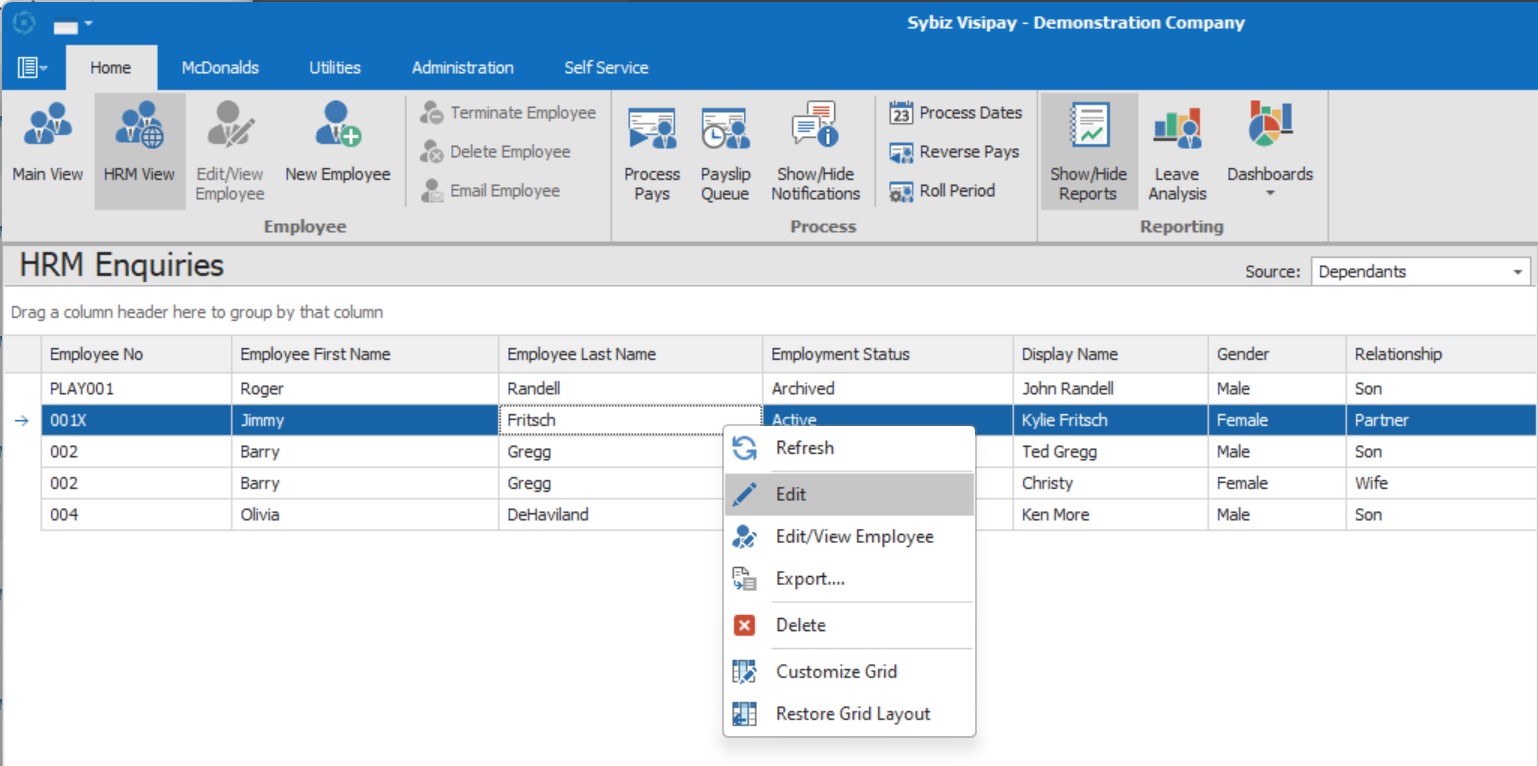
An easier way to mantain employee data
The HRM grids now allow editing and deletion of data directly from the grid, instead of digging into individual employee records. Editing depends on the security rights assigned to the logged in user. (CR210345798)
Getting ready for Payday Superannuation - Qualifying Earnings
A new Qualifying Earning flag has been added to relevant Pay Item configuration with the box checked upon upgrade if the pay item was flagged as superannuation applies. You must review your pay items after upgrade to ensure they are configured as desired. (CR2509-5114)
Employee onboarding
The Sybiz Employer Portal now includes an employee onboarding process for new employees to collect information regarding tax, super and banking. The onboarding process will continue to evolve to provide further streamlining improvements for new hires.
Deactivate Superannuation funds
Superannuation funds can now be made inactive, preventing their use in the future. The end-user is warned when an active employee is still referencing this superfund whenever they make changes to it. (CR210646264)
Attach files when using SMTP email
The email preview when not using Outlook now allows for files to be attached and sent at the same time. (CR2312-2934)
Employee reminders can be archived
When processing pays and a reminder is presented to the end-user an option to archive the reminder instead of deleting it is presented. The reminder is turned into a note against the employee record with the original date retained. (CR2503-4463)
Notify employees when payslips are available in ESS
End-users can now setup a ESS payslip layout and select employees to be sent this email instead of their traditional payslip email. The intention is that the user is advised to visit ESS web page or app to view their payslip, rather than it being encrypted and sent. (CR2506-4734)
Finer-grain control of payroll postings
End-users can now clear a previously entered general ledger account in the payroll journal setup wizard. This allows specific combination of department/pay item being prohibited and creating an error at the time of journal creation to allow for correction before it is posted. (CR2507-4827)
Fixes & Improvements
- All references to LumpSumE minimum values have been removed from the software (CR2503-4470)
- Registry settings updated for web update purposes. (CR2507-4870)
- When creating a staff type using the import routine, the standard leave types are assigned. This replicates the same behaviour if they had been created manually. (CR2502-4379)
- Custom fields that are identical to existing fields on the employee database tables work and display data as expected. (CR2506-4759)
- Visipay Company Manager now works with non-sequential leave types and pay item groups. (CR2507-4800)
- Public holiday dates for boxing day in 2025 & 2027 have been corrected. (CR2508-4923)