
More ways to make paying super a success
Send SybizSuper data directly to the Sybiz Employer Portal
SybizSuper users can now use their Sybiz Employer Portal login credentials to securely send data directly from Sybiz Visipay to the Sybiz Employer Portal, powered by SuperChoice. No longer will you have to generate a local file to manually upload to the portal, but the batch will still require a manual 'Confirm & Send' due to the financial obligation. Once the information is transmitted, users will receive an email highlighting any issue or providing additional instructions for processing and submitting the data via the Sybiz Employer Portal. (CR2607-6319)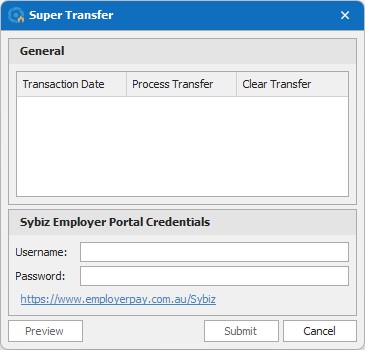
Minimum information required when adding a new super fund
When adding a super fund to lookups, fields for 'Number' have been changed to display either USI or ABN, depending on whether the fund is a self-managed super fund. Warnings are displayed if USI doesn't meet expectations, and self-managed super funds cannot be saved without a valid ABN. Additional information is also mandatory for self-managed super finds to ensure successful submission to the Sybiz Employer Portal. Fund Number and Self-Managed Super Fund values are removed for Papua New Guinea databases. (CR2607-6301)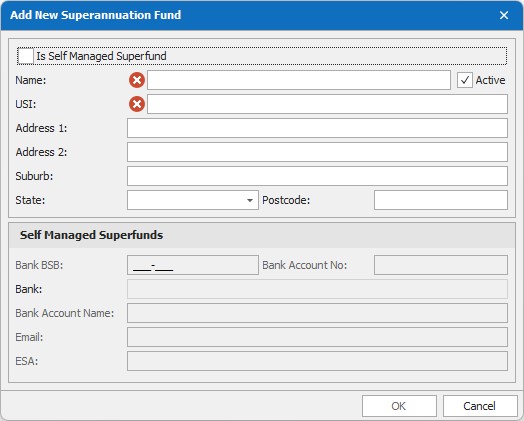
New rules enforced for staff types
Length of service added to age classification
Due to changes in legislation, length of service must now be considered to determine the appropriate award rate for certain junior employees in the retail, fast food and pharmacy industries. New staff types will need to be created and maintained to cater to length of service for employees 18-20 years of age in accordance with rates changing at 1 December 2026, 1 July 2027, 1 December 2027, 1 July 2028, 1 December 2028 and 1 July 2029. (CR2611-6801)
Default pay superannuation value for new staff set to percentage
When creating a new staff type, the superannuation method is percentage and will read the superannuation percentage amount assigned to the current financial year. This only applies to Australian databases. (CR2604-5857)
Advise user when super amount may not meet minimum legal requirements
Warnings have been added to staff type to advise when super is below the configured financial year percentage, or when using a fixed amount (CR2607-6374). On upgrade, all staff types that have a superannuation gross amount that isn't $0 will be reset to $0 and prevented from changing in the future. When configured with a value, it is not possible for an employer to meet their ESG requirements. (CR2604-5858)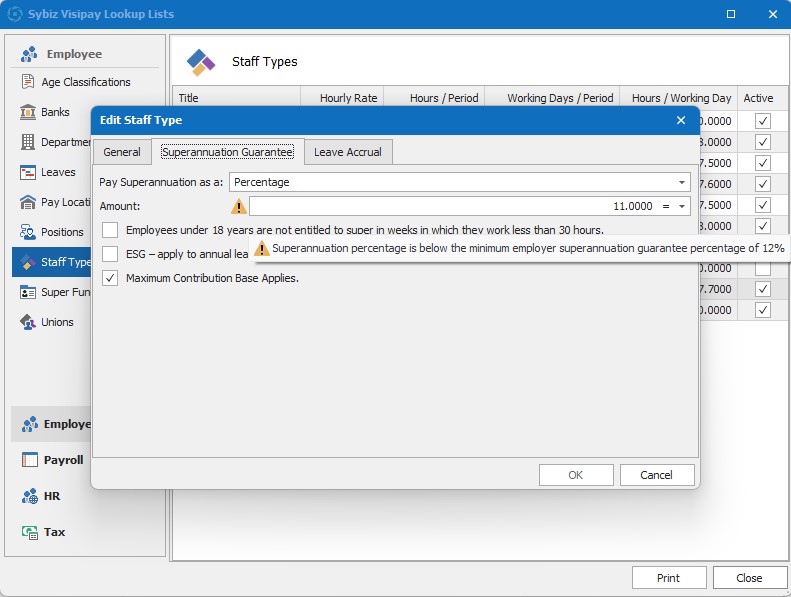
Better reporting for easier reconciliation
STP2 Reconciliation Report can be compared to Sybiz Employer Portal
The gross figure will now match the value on the Sybiz Employer Portal, and the individual earnings components are shown separately in their own sub-detail band. The totals at the bottom of the report should match those from the Sybiz Employer Portal. (CR2607-6307)
Pay Summary Complete can be compared to STP reporting
The Pay Summary Complete report now includes an STP total, which calculates the earning items on the report to make it easier to compare to the Sybiz Employer Portal or STP2 Reconciliation Report. (CR2607-6310)
Hold ESG date added to Dates list report
The Hold ESG Until date is now included in the dates list report. (CR2606-6253)
Google Workspace direct email support
Google Authentication is now supported to make it easier to send email using Google Mail Services. (CR2605-6024)
'None' email option in settings
A new ‘none’ option is available to disable and prevent all email functions within the program. This is the default for a new database. supress the sending of emails on transaction processing with the new ‘None’ email option in settings, helpful in training databases and when testing new processes. (CR2604-5842)
Hide the database path from the status bar
Database information can be concealed from the status bar for security and privacy reasons. (CR2606-6151)

Changes to SQL Express warning messages
Microsoft's SQL Server 2025 Express has increased the maximum database size from 10GB per database to 50GB per database. Sybiz end users are advised that they are running SQL Express in the tooltip, but all other specific messages about running SQL Express have been removed. Databases under 1GB do not show their size. (CR2607-6402)
Sybiz Vision Classic deprecation
Sybiz Vision Classic has been removed as an option for timesheets and staff import. If configured at the time of import, it will be deactivated. Learn more about the end of life for Sybiz Vision Classic. (CR2602-5637, CR2605-6081)