
Payday Super FAQs
Your Payday Super questions answered
The topic links below will help you find answers to frequently asked questions regarding Payday Super, using SybizSuper for Payday Super, and Sybiz Visipay data and STP changes.
Now that Payday Super is live we are pleased to report STP and Super submissions are coming through thick and fast. Here are the hot topics (also covered further below).
1. The Sybiz Super Transfer button is used for SybizSuper submissions from 1 July, the old SybizSuper Export can be used up to the final submission for the 2025/26 financial year (ie end date up to and including 30 June).
2. The Sybiz Super Transfer button appears after rolling into 2026/27 AND logging out and back in.
3. When navigating between the Super Contributions History and STP Submission History in the Sybiz Employer Portal, the Status filter may revert to a narrow selection, if submissions are missing set the Status filter to All Selected.
4. To make the most of the 7 business day window, transfer and pay your superannuation by 4pm AEST on pay day. Be mindful that it may take a few additional days for the super funds themselves to update the members' records, once your submission has a status of Sent to Fund you can relax.
You can click on the links below to jump straight to each topic.
Payday Super
It is simply the concept of paying superannuation at the same time as paying employees. ATO resources should be referred to as the single source of truth; our guidance will be mainly restricted to the context of Sybiz Visipay, rather than republishing information that is regularly updated by the ATO.
Current guidance is that, like STP reporting, super related to out-of-cycle pays can be paid as part of the next regular pay cycle, with the exception of payments to terminated employees for which super must be paid at the same time.
You can use the Sybiz supported and preferred option of SybizSuper; the optional SAFF file and a clearing house of your own choosing; or a custom solution totally outside of Sybiz’s control. Whichever path you choose, you should have well and truly established ahead of 1 July 2026. Note that the ATO’s Small Business Superannuation Clearing House (SBSCH) is no longer an option.
The ATO and Sybiz encourage businesses to be ready well ahead of the commencement date. With the disruption this brings as well as the increased cost to business, please be aware of scam operators promising to act as free intermediaries.
Sybiz Visipay 26.10 is the minimum version to support the required STP reporting associated with Payday Super. Sybiz Visipay 26.11 is the minimum version if using Sybiz Visipay to pay and report superannuation to contractors under Voluntary Agreements or Non-Employees.
Refer to the ATO’s guidance.
Yes. For those using SybizSuper, we have different export options to separate the pre-Payday Super contributions from the Payday Super contributions. To assist with this transition, the current ‘SybizSuper Export’ button will be in place for contributions to the end of 2025/26, and a new ‘SybizSuper Transfer’ button will be in place once you roll into the 2026/27 financial year, for Payday Super purposes.
Cashflow impacts are the most notable, especially with the crossover from the old, quarterly frequency. In addition, there is an increase in work required at payday, and the timelines to complete various obligations are tighter. You will want to regularly remind employees to be proactive in notifying of any changes to their superannuation arrangements and plan to monitor any messages associated with rejected contributions.
A MVR is designed to make employers communicate with superannuation funds proactively when a new staff member is hired or a change is made to an employee’s super fund to ensure the nominated fund has the employee registered on their system and is able to accept contributions from you. This is an evolving requirement and will be in place by 1 April 2027 - more information will follow. In the meantime, a new staff member can check their MyGov ATO for super details and employers can use the ATO Online Services to submit a Stapled Super request.
Sybiz Visipay uses a Sending Service Provider (SSP) model for Single Touch Payroll reporting. Although not technically related to Payday Super, there is a new requirement coinciding with Payday Super to link an SSID to your business’s account via the ATO Relationship Manager facility. Sybiz, through it’s SSP, has arranged for a 12-month deferral to 30 June 2027 to mitigate the impact of Payday Super. You do not need to do anything to avail yourself of the deferral, but be mindful that the ATO will likely include the SSID requirement in conjunction with communications about Payday Super.
SybizSuper
SybizSuper is effectively a superannuation clearing house service that uses the Sybiz Employer Portal to upload and transmit super data via the SuperStream reporting standards. The workflow includes direct debit payment instructions. It has been in operation for over a decade.
The government has discontinued the Small Business Superannuation Clearing House (SBSCH), and the options for Sybiz Visipay users are to use SybizSuper or to add the Superannuation Alternative File Format to their Sybiz Visipay license and find a clearing house that will accept the industry standard file.
Yes, please refer to the SybizSuper PDS for more information.
There have been significant increases to the cost of providing the service, as infrastructure has had to be upgraded to handle the loads and bank fees associated with the New Payment Platform (NPP) are significantly higher. Sybiz has been able to maintain the same per-transaction fee as per the SybizSuper PDS.
We have a dedicated section on our website, including the guidance for getting started.
SybizSuper & Payday Super
This FAQ section outlines questions that arise for customers using SybizSuper from the 2026/27 financial year (Payday Super era). Importantly, the actual process of SybizSuper has not changed significantly, but there are some additional variables that come in to play. The new Sybiz Super Transfer option (appears after rolling into the 2026/27 financial year and logging out and back in) is to be used for Payday Super purposes, whilst the SybizSuper Export will remain in place for submissions for the quarter ended 30 June 2026.
When navigating between STP2 Submission History and Contribution Submission History check to ensure you have All Selected in the Status Filter if you're unable to see all expected data.
A knowledge base also exists within the Sybiz Employer Portal: https://scknowledgebase.zendesk.com/hc/en-au (note that these resources are generic)
Due to the increased frequency of reporting under Payday Super, the exported file has been changed to a .SAFF extension (used to be .CSV). As such, Windows does not know what to do with that file. The file can still be opened using the File… Open… process of your program with the file type set to ‘All Files’ or equivalent. Take extra care if you do need to open the file, as subsequent saves can alter the file contents unintentionally, such as removing leading zeros from number fields.
You will have to log out and back in to Sybiz Visipay and the Sybiz Super Transfer button will be available on the Pay Run tab and also the Utilities tab.
Remember it's 7 business days, not calendar days. We strongly recommend transferring and paying super on payday to maximise the 7 business day window. Once your SybizSuper submission shows a status of Sent to Fund it may still take a few days for the super fund to update records in your personal account. Most issues arise earlier in the piece where checks are performed upon uploading your submission and also in the days prior to being sent to the funds.
Once you have uploaded the file into the Sybiz Employer Portal and Confirmed & Sent it you can clear it. It is very similar to bank transfers in that if you don't clear them and retransmit them you will end up paying again, so do take care!
Check your recycle bin on your computer to see if the file can be restored. If you've deleted it after uploading to the Sybiz Employer Portal you will be able to download it from there (via Contribution Submission History and click the Download icon adjacent to the filename). Otherwise, contact Sybiz for assistance, for which a small fee may apply from 1 August 2026 (you will need to provide access to your database server and Sybiz Visipay database, so have those details handy prior to contacting Sybiz).
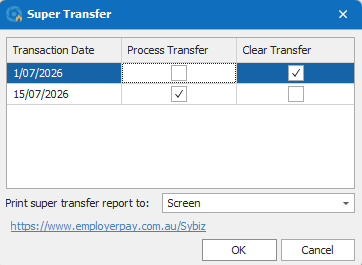
Because you're paying super each time you pay, you select the pay batch(es) you want to include - and clear any that you already successfully transmitted, via the Sybiz Super Transfer option. The dates are automatically included in the file based on the date ranges of the pay batches themselves. This is a lot simpler than the previous need to nominate a date range with the old SybizSuper Export process.
Use the Sybiz website contact form to request a call and we will reach out during our work hours. Remember, Payday Super provides 7 business days for monies to arrive in funds, so don’t panic if issues arise on non-business days.
At this point in time it is not possible; as soon as you Confirm & Send the batch the payment process initiates.
Payday Super is an employer obligation in that the ultimate responsibility rests with the employer if the obligations are not fulfilled. Generally, new employees and employees changing funds provide you with more time to make payment but it is recommended to pay the super for the rest of your employees and make ad hoc contributions for your new employees. There are alternative processes available to employers in these circumstances and you will find detailed information at the ATO: https://www.ato.gov.au/businesses-and-organisations/super-for-employers/about-payday-super#Offeringemployeesastapledfund
Drill down into your submission via the Submission History (click on the file name in question), when you see an error or warning icon, click on the icon (it will be coloured with a number denoting the number of issues in the records) and the cell(s) with issues will have a coloured border. Hover over the cell to see the underlying issue to resolve. In some cases, the messages may direct you to contact the fund or the ATO, in which case contact them.
Under Payday Super, super funds have less time to handle imperfect data. In the past they may have updated data such as member numbers, but if you have not updated your payroll data to match, and continue to transmit the incorrect information, super funds may no longer have the time to exception manage. You should action any data corrections required.
Use an ad-hoc contribution in such circumstances, noting that the refunds may not be received until after Payday Super deadlines lapse, so do not delay (i.e. there is a cashflow impact, as the ad-hoc contributions will be paid before the refunds are received up to 14 days later). Also, take note of the actual error itself, and remedy the issue prior to future contributions being paid. If the underlying issue is that the employees have changed super funds, then obtain those details from the employees prior to making the ad-hoc contribution.
The fund needs to be added to your Sybiz Visipay lookups before it can be allocated to an employee record. Go to Lookups > Super Funds to add the fund. The USI for the Super Fund should be placed in the number field, unless the fund is an SMSF in which case the ABN is placed in the number field.
Yes, there is, but you will need to be certain to select the correct fund in the case of multiple funds with similar names. If possible, ask your employee to log in to their MyGov account and advise the correct details. The list of USI’s can be found here: https://superfundlookup.gov.au/Tools/DownloadUsiList?download=usi
Under Lookups > Super Funds you are able to add Self Managed Super Funds (SMSF) as well as ‘normal’ (APRA) superannuation funds. The ‘Number’ field is used to store the ABN for SMSFs and the USI (Unique Superannuation Identifier) for other super funds. Note the additional information required for SMSFs includes banking and Electronic Service Address details. When you submit your SybizSuper file you may need to create the SMSF record on the Sybiz Employer Portal if you receive an 'Unrecognised SMSF' error. Simply click the Create SMSF button to complete the process.
SMSFs need to remain complying and also have a valid Electronic Service Address (ESA). To check the status of the SMSF, go to: https://superfundlookup.gov.au/ and input the ABN of the SMSF. Some ESA providers have recently ceased providing the service, and if a new ESA provider is required, the SMSF will need to source one via: https://tinyurl.com/SMSFESA (ATO link). SMSFs receiving contributions may need to be set to receive payments under the New Payment Platform (NPP).
The Sybiz Employer Portal extracts the name from the ABR based on the ABN, so it will be the correct legal name; update Sybiz Visipay to match.
Sybiz Visipay Data and STP changes
A new concept of Qualifying Earnings has been introduced. Pay items are flagged as Qualifying Earnings if they were set to Superannuation: Does Apply. The Maximum Superannuation Contribution Base changes from quarterly to annual going forward.
From a Sybiz Visipay perspective, the main change is the reporting of Qualifying Earnings from 1 July 2026.
We’ve added a new Pay Run tab to the user interface to group together the key processes typically followed during a pay run. You have the choice to keep using the software menus you are used to, or use the new Pay Run tab – the underlying functionality is identical. There is also a new Sybiz Super Transfer process to use instead of SybizSuper Export from 1 July. This button will appear after restarting Sybiz Visipay once you have rolled in to 2026/27, the button will also appear on the Pay Run tab.
In a lot of cases, nothing. We’ve engineered the upgrade in such a way that it infers future settings based on current settings. Most significantly, if a pay item was flagged as Superannuation: Does Apply, it will be flagged as Qualifying Earnings. Similarly, if a Staff Type was flagged to apply the quarterly maximum superannuation contribution base, it will be flagged to apply the annual equivalent from 2026/27. Note that the amount is now centralised under the Settings… Company Details area and is preset to $270,830 for 2026/27 once you roll the year.
Absolutely. If there are pay items that you have been paying super on that you are not obliged to under the superannuation legislation, then you can remove the Qualifying Earnings flag. You should also be mindful of items such as Commissions that are derived directly from overtime, which are now subject to the employer super guarantee and are deemed Qualifying Earnings.
By reporting Qualifying Earnings, the tax office will have a base upon which to levy the Superannuation Guarantee Charge and associated penalties if you fail to meet your Payday Super obligations. In other words, pay items that you choose to pay super upon will be treated differently to pay items that you must pay super upon.
Yes. The out-of-the-box version will show the amount, but if you have an edited version of the report, you will need to change the layout to include the QE flag. Note that even though pay items are flagged as Qualifying Earnings prior to 2026/27, the actual calculation of QE and the reporting of it does not occur until you start paying in the 2026/27 financial year.
We’ve put together a separate page to guide you through what is required.
We have a separate export facility for SybizSuper for the Payday Super era that treats the underlying data differently based on the pay date. For the final contribution for the 2025/26 financial year, use the SybizSuper Export button; going forward into 2026/27, use the Sybiz Super Transfer button to submit superannuation contributions. The SybizSuper Export button will be removed when rolling into the 2027/28 financial year.
Employees under the age of 18 that work 30 or less hours per week will still not qualify for super. Pay items that are set as Qualifying Earnings and are paid to such employees will not actually post to their Qualifying Earnings. At the other end of the spectrum are employees 75 years or older who are restricted as to the types of super they are entitled to. In Sybiz Visipay terms, this cohort should only derive super from qualifying earnings pay items.
Also, be mindful of employees that earn over the Maximum Superannuation Contribution Base (MCB) – the year-to-date Qualifying Earnings for these employees will not exceed the MCB even if they are continuing to be paid pay items that are tagged as Qualifying Earnings. For clarity, you do not need to set up separate pay items to manage these circumstances – Sybiz Visipay is smart enough to handle it. There are also different treatments associated with salary sacrifice to super and salary sacrifice to non-super (fringe benefits and exempt benefits, for example).
Sybiz Visipay now has a ‘Hold Super Until’ date in the employee record. Simply input the end date for the period in which the certificate applies and Sybiz Visipay will do the rest. The ATO will data match at their end to ensure you are not penalised for underpaying super in these circumstance, therefore there is nothing special required from an STP reporting perspective.