

It’s been one month since Payday Super went into effect, and Sybiz is pleased to report that the collective efforts of our customers, Authorised Business Partners, SuperChoice and the Sybiz team have resulted in a relatively smooth transition. We thank everybody for their efforts and patience during this transitional period.
According to SuperChoice, industry sentiment has remained broadly positive while employers and funds continue to adapt to the increased frequency of super contributions. Money and data mismatch continue to be a focus point, however, with an industry-wide remediation effort ongoing.
If you’re having trouble with SybizSuper submissions, our Payday Super FAQs are the best place to look for current information. Based on customer enquiries and feedback, we’ve noted these common pitfalls to avoid.
Generating a .SAFF File: Sybiz Super Transfer vs SybizSuper Export
One issue we’ve heard often from our customers is confusion over the new SybizSuper export process. New reporting requirements related to Payday Super mean that the old way of generating a file to submit to the Sybiz Employer Portal will no longer work for the 2026-27 financial year and beyond. In Sybiz Visipay, on the Utilities tab, you’ll see two buttons: The old one labelled SybizSuper Export (which needed to remain for final 2025/26 submissions, due late-July 2026), and the new one labelled Sybiz Super Transfer.
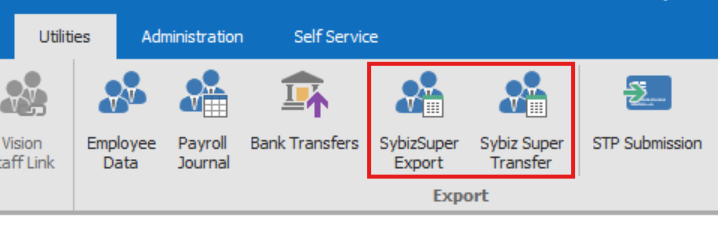
The Sybiz Super Transfer button is the function to use going forward. This will present you with a dialog window with options similar to conducting a bank transfer from Sybiz Visipay. The pay period will be prefilled; select the period you intend to submit, and clear any periods that have already been uploaded to the Sybiz Employer Portal to prevent these periods from being processed twice.
To assist in reminding you which button to use now that Payday Super is in effect, use the Pay Run tab, which consolidates frequently used payroll functions into one convenient location.
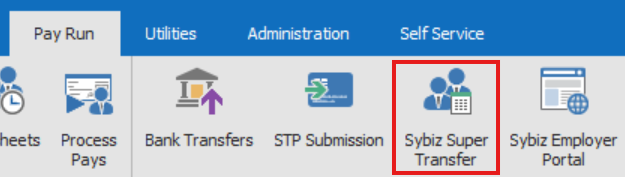
Once you roll into the 2027-28 financial year and the SybizSuper Export will be automatically removed from the interface.
The .SAFF file generated from the transfer process is the file you upload to the Sybiz Employer Portal. Be sure not to make inadvertent changes to .SAFF files; opening the file in a program such as Excel may accidentally remove leading zeroes and other formatting that is specifically required for accurate reporting.
Timeline of processing
Under Payday Super, employees must ensure that the full employer superannuation guarantee contribution for each employee is received by their super fund within 7 business days after payday. An extended usual period of 20 business days is available in specific circumstances, such as for a new employee’s first payment or the first payment to a new fund for an existing employee.
Funds have 3 business days to notify employers if a contribution cannot be matched to a member record. Any rejections or errors must still be corrected within the original 7 business days. Sybiz strongly recommends transferring and paying super on payday to maximise the 7 business day window.
Payday Super has dramatically increased the number of transactions processed by clearing houses, and some users may find that processing time has increased, even if it still falls within the appropriate windows. This is to be expected for the first few pay cycles in the new financial year as institutions adjust their workflows and iron out error message reporting. Similarly, funds may have started rejecting imperfect contributions they previously accepted, now that they have less time for manual intervention.
The ATO has taken into consideration the need for an adjustment period surrounding Payday Super, and is focusing its efforts on helping you transition and get it right. Businesses which make a good faith effort to make superannuation payments on time and correct errors swiftly will be categorised as low risk. More information is available on the ATO’s website.
Warning and error messages
Correcting errors in submitted superannuation data is important to maintain compliance and assure a smooth Payday Super process. To identify issues with your SybizSuper contributions, navigate to the Reports section of the Sybiz Employer Portal, either from the top ribbon or listed in the Contributions column. From within the Reports screen, you can use the filters to display error, warning or info feedback messages. You can also group messages depending on what information you’re seeking. Drilling into submissions under Contribution History also provides a pathway to identify specific issues to be addressed.
Clicking into the results will give you the related codes and messages for each notification. Depending on the notification type, you may need to contact the fund or the ATO. Learn more about status icons from the SuperChoice Knowledge Base here.
Once you have identified and rectified any issues, you can complete an ad hoc contribution. Consult the Sybiz Employer Portal – Contributions Employer User Guide for more information.
Payday Super can look complicated, but Sybiz is ready with complete resources and webinars to guide you to success.

